
On Heckler and Bullit E-bike models, the Shimano power button (shown below) features an internal battery that can lose power if the bike sits idle for an extended period of time. This can occur even if the main battery in the frame has a full charge.
Other styles of power buttons are not affected.
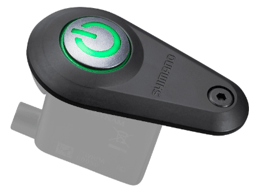
⚡ The Quick Fix: Recharging Your Power Button
Most "dead" Shimano power buttons aren't actually broken; they just need a little juice to wake up. The system relies on a connection between the main battery and the control unit.
Step 1: Check Your Main Battery
Before assuming the button is a goner, make sure your main battery isn't completely flat.
-
Locate the Port: Find the charging port on the non-drive side of your frame, near the motor.
-
Plug It In: Open the cover by hand and insert the charger plug fully.
-
Top It Off: Let it charge until the status indicates it's full.
Step 2: The "Wake Up" Routine
If your bike has been sitting for a while (over 6 months), the battery might be in a deep sleep mode.
-
External Charging: Sometimes the button needs to be "jump-started" by charging the main battery for at least 30 minutes while it's installed in the bike.
-
Direct Interaction: Try pressing the power button on the battery itself (if accessible) rather than just the one on your handlebar or top tube.
-
To perform the recharge procedure at home you will need the following:
- PC laptop or desktop computer (IOS is not compatible)
- Download the E-Tube Project Professional software for PC computers
- Shimano PC Linkage Device Micro USB Port, SM-PCE02
- SM-PCE02 PC Link cable, MPN Y79M9801T
🛠️ Troubleshooting Connection Gremlins
If a good charge doesn't do the trick, you might have a loose wire playing hide-and-seek.
Check the Drive Unit Connections:
-
Remove the Cover: Use a Phillips head screwdriver to remove the three screws on the drive unit cover.
-
Inspect the Wires: Ensure the main power cord (far left), speed sensor wire (center), and Di2 wire (right) are all snug and secure.
-
Pro Tip: The speed sensor wire has a notch on the plug—make sure it’s aligned perfectly with the port!
-
-
Seal It Up: Reinstall the cover and those three screws.
📱 Use the App for a Health Check
Still seeing errors or getting a cold shoulder from your power button?
-
Connect to the Shimano E-Tube Project app
-
It can help you identify specific error codes and even update your firmware, which often clears up weird power issues
Important: The Shimano STEPS system isn't a DIY playground. If the steps above don't work, don't start poking around the internal electronics. Take it to your local Santa Cruz dealer or Shimano Authorized Service Center—they have the special tools and the magic touch to get you back on the trails.