If you need additional information about your Bosch battery and charger, please reference the Bosch Owners Manual on our website or the Bosch website, found on page 4.
-
Switch the eBike battery off .
-
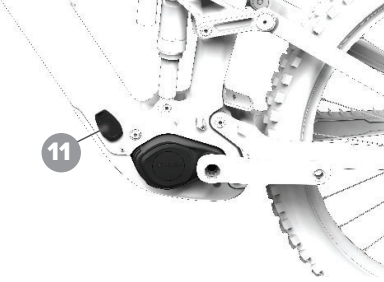
Locate the battery charging port on the bicycle (11).
-
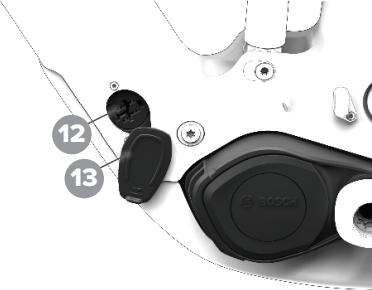
Clean the cover of the charging socket (12). Avoid getting dirt, e.g. sand or soil, in the charging socket and contacts in particular.
-
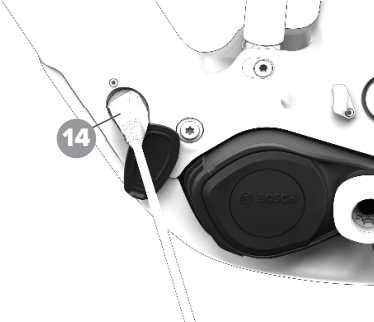
Lift the cover of the charging socket (13) and plug the charging connector (14) into the charging socket.
WARNING
There is a risk of fire due to the charger heating up during charging. Ensure the eBike battery on the eBike is completely dry and placed on a fi reproof surface before charging. You MUST read and observe all of the operating and safety instructions of the eBike battery, charger, and all other system components.
BATTERY REMOVAL
The battery should not be removed for charging or regular use. If you need to remove the battery, please consult with your authorized Santa Cruz Bicycles dealer.
WARNING
Do not remove the battery without special tools and expertise. Battery removal involves removing the drive unit and charge port.
POWERING THE SYSTEM
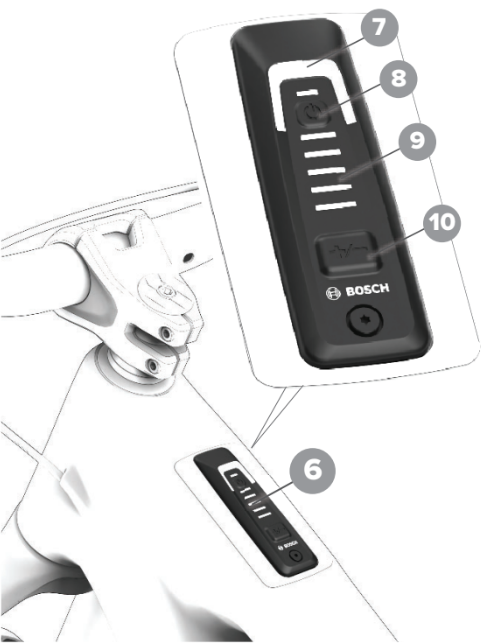
To switch on the eBike, briefly press the on/off button (8). After the start animation, the state of charge of the eBike battery is displayed in color with the battery charge indicator (9) and the set assistance level with the assistance level LED (7). The eBike is ready to ride. To switch off the eBike, press the on/off button (8) briefly (< 3 s). The battery charge indicator of the eBike battery (9) and the assistance level LED (7) go out. If no power is requested from the drive for approximately 10 minutes (e.g. due to the eBike being stationary) and no button is pressed, the eBike switches off automatically.
BATTERY USAGE
In the eBike battery charge indicator (9), each ice blue bar represents 20% capacity and each white bar represents 10% capacity. The top most bar shows the maximum capacity.
Example: Four ice-blue bars and one white bar are displayed. The state of charge is between 81% and 90%. If capacity is low, both of the lower displays change color:
BAR CAPACITY
- 2 × orange 30% to 21%
- 1 × orange 20% to 11%
- 1 × red 10% to reserve
- 1 × red flashing reserve to empty
If the eBike battery is being charged, the top most bar on the eBike battery charge indicator (9) flashes.